
How to download a YouTube video on PC or mobile?
In this article, we will see in detail how to download a Youtube video.
YouTube is the world’s largest video-on-demand platform.
Youtube has more than 2.7 billion active users each month on the platform. Which makes it one of the most popular social networks in the world.
If you want save Youtube videos To watch them later, you need to learn how to download YouTube videos efficiently.
You can download YouTube videos in formats like MP4, AVI, MPEG, etc.
Or if you only need the audio format, you can convert YouTube videos to MP3 files.
With so many ways to download and access videos on demand, it can quickly get lost. This is why you will find in this guide everything you need to know to simply download a Youtube video.
Downloading YouTube videos is a simple and straightforward process.
To download a Youtube video, there are different ways available to you:
- Download a Youtube video via Youtube Premium (requires the app and a paid subscription)
- Use a video converter to download
- Use a website to download a Youtube video
Most Youtube or website video converters for record a Youtube video work the same way.
Operation is simple.
Copy/Paste Youtube video URL
When you go to a Youtube video download website like savefrom.net or odownloader.com, paste the URL of the Youtube video you want to recover.
Once pasted, click “Download” or “Upload”
Choose the YouTube video download quality
After clicking on “download”, the platforms generally ask you in what quality you want to download the Youtube video and even in what resolution. So choose the quality that suits you then click on download.
Note that some Youtube video download tools may offer paid plans to download a Youtube video in high quality for example.
Before choosing a Youtube video converter, make sure to check the following points.
- Video quality : The converted file must have good video quality. Ideally, you should be able to choose the export quality of the video. It can vary between low, medium and high. It’s even better if you can choose a specific video resolution like 360p, 720p, 1080p, and more.
- Retrieving subtitles : If the video you want to recover is not in French, you may want to recover the subtitles in the process. Some converters allow you to download them.
- Uploading multiple files : you can download files individually or in bulk depending on Youtube playlists. If you like a particular band, you might want to download their entire discography.
- Compatibility with multiple file formats : It can be convenient to download your Youtube videos in the ideal MP4 or other format. Being able to choose from multiple options, like MP3, MP4, FLAC or AAC, allows you to be more flexible.
There are many ways to download Youtube video to MP4 easily.
We are going to give you a technique unlike many others but effective.
- Visit YT1S.com
- Paste the URL of your favorite Youtube video
- Click Convert MP4
- Choose the desired format (1080P, 720P, MP3, etc…)
- Click Download
And there it is, it’s as simple as that! You now have the Youtube video of your choice on your smartphone or computer.
This is one of the easiest ways to download a YouTube video in good quality and MP4 quickly.
For download a Youtube video in good qualityyou can use different techniques, either through a paid solution or via a website where you can choose the download quality.
For example, if you decide to use the free website loader.to you can choose the quality of your choice before downloading your Youtube video in one click.
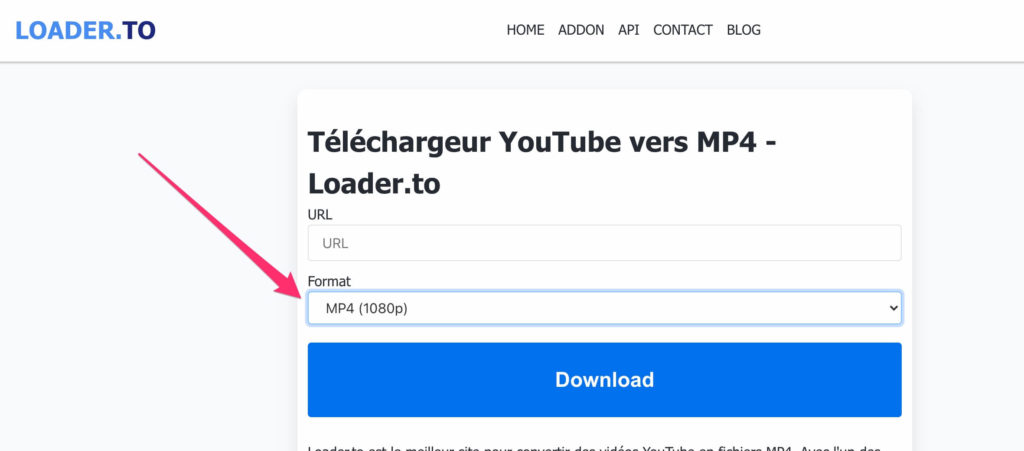
This solution is ideal if you want to download a Youtube video in high quality.
If you don’t have VLC media player installed on your computer, you can download it. VLC Media player is secure and allows you to download videos from YouTube more easily.
- Copy the URL of the Youtube video
Go to YouTube and open the video you want to download. Next, copy the video URL.
- Open VLC Media Player.
- File > New network flow.
When you open the VLC media player, go to the “File” or “Media” option and click on it.
Next, select the “Open Network Stream” option.
- Open the media.
At this point you will see a page with a text field, regardless of which operating system you are using. Here, paste the copied URL of the YouTube video you want to download.
- Click the “Open” button.
When you click on the “Play” option, the video starts playing on VLC.
- Codec information.
Next, click on the “Tools” option in the upper right corner. There you will find an option called “Codec Information”. You can also access the “Codec Information” option by using the “CTRL + J” command.
When you click on “Codec Information”, a new window opens.
- Location.
You need to copy the video information from the location text box at the bottom of the page. This step is quite simple for Windows users.
However, if you are a Mac user, you need to right-click on the field and click on the “Open URL” option.
- Copy/paste the URL.
- Save the video.
At this point, the video should be playing on your online browser. Right-click on the video and select the “Save Video As” option.
- Download the video.
The video will now start downloading. The default format is an MP4 file, and the default title is “videoplayback”. Once the video is downloaded, save it with your other videos.
UPDATE 2022: It seems that it is no longer possible to download a Youtube video via VLC, so we advise you to use a dedicated website mentioned in the following paragraph.
You may also like: download Facebook video without software
While some solutions require downloading software from your computer to record a Youtube videoother solutions exist.
To download a Youtube video without software, you will simply need a video converter website and the link of the video you want to download.
Here is a list of the best software to download a Youtube video without software:
You may also like: How to create a GIF online?
Is it legal to download a Youtube video?
According to Youtube’s general conditions of use, it is prohibited to download videos from the platform.
However, Youtube has never sued anyone for this use case. It is therefore tolerated by Youtube to download videos from the platform.
Youtube could instead sue video downloading websites and software.
However, it is strictly prohibited to use the downloaded videos for commercial purposes under penalty of copyright infringement.
If you just want to listen to your favorite artist, you can download the clip video without risk, but be careful with any reproduction.
You may also like: How to create a Youtube playlist?