[Outil SEO] The power of Google Search Console in SEO
Optimizing your site to convert more is one of the best investments you can make in your business.
Having a website that works cleanly and generates conversions can be a lifesaver for a business. But it’s not that easy to convert visitors into leads.
Fortunately, Google has free tools that can help you fill in any gaps or difficulties in your site like Google Search Console, Google Analytics, etc…
Optimization should be at the forefront of your strategy.
In this article we will look at Google Search Console.
GSC provides data that you can’t find in Google Analytics. But the key is knowing how to use this data to your advantage.
Let’s get into the thick of it.
What is Google Search Console?
Google Search Console is a free tool that Google provides to help you monitor and maintain the natural SEO of your site.
Using Search Console can help you understand why your site is performing well (or poorly) in organic results.
Search Console has several uses. SC ensures that Google has access to your content, helps you monitor spam issues to keep your site clean, can help you submit new content for crawling, and allows you to remove old, outdated content.
This tool is not only reserved for SEO technicians but can be used by many different people as the possibilities are great.
You can find tons of detailed data on website traffic, rankings, search results, site errors, redirect issuesand more.
Just take a few minutes to install it on your site by adding a property and that’s it, you can start exploring your site.
Go to your console dashboard and you will see a list of options on the left:

From here you can access data about search traffic, rankings, appearance, search data (like 404 errors), security issues, web tools, and your indexed links.
Each section will display unique reports on your site and will be able to give you critical information about your site’s performance.
The downside of Search Console is that it doesn’t help you fix problems but only helps you understand them. (which is already good, we agree)
Optimize HTML pages using the Google Search Console SEO tool
If you’ve ever crawled your website using Google PageSpeed Insights, you know that there are thousands of issues that can affect a site.
These could include large images, heavy page elements, and coding issues.
Minimizing your JavaScript, CSS and HTML is an important factor in improving speed.
And speed is the key to optimizing your site.
If you want to have more customers and not lose traffic, speed should be an important priority.
A fast site leads to better SEO in the SERPs.
But knowing that speed is crucial and HTML can make an impact is only half the battle.
This is where Search Console comes in! Go to your dashboard and click on the HTML Improvement Report:
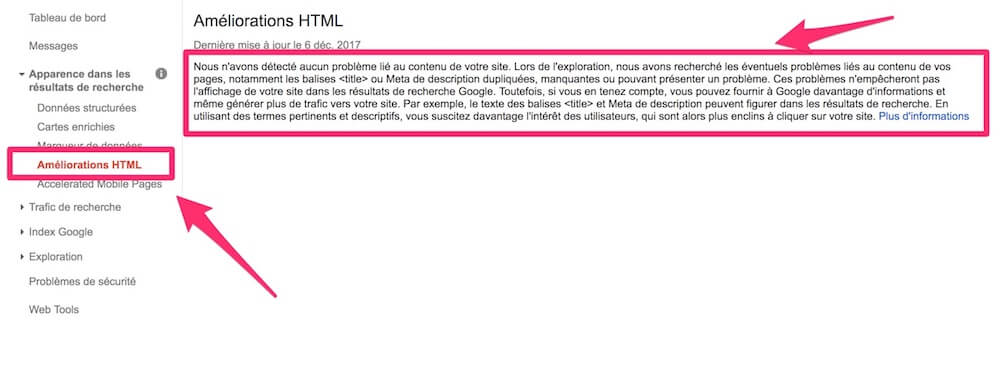
Here for example, there is no improvement to be made. Otherwise, you may find different suggestions such as meta descriptions that are too short, pages with the same title, meta titles that are too long, etc.
All of these issues can impact your HTML and lead to a slow and underperforming site.
If you click on one of the HTML improvement suggestions, like “meta title too long”, you can get a list of the exact pages where this happens.
You can then repair them in your website directly. Quite practical, isn’t it?
Find the queries that really drive traffic right in Search Console
One of the biggest benefits of Google Search Console is the ability it gives you to find the queries that drive traffic to your site.
The most knowledgeable among you will tell me: “Yes, but Google Analytics already gives us this data”. In general, most GA requests will be defined as “not set” or “not provided”. Thanks GA!
Here, we’re talking about a detailed list of queries that drive traffic to your site and your position in Google in relation to these queries.
If you know how to use Google Search Console, you can discover tons of useful keyword data.
You can find different metrics, like clicks, impressions, click-through rate, and even positioning for given keywords and pages.
Instead of optimizing your site blindly, you can use this tool to see how your pages behave for specific queries.
You can use this data to make future decisions or make changes to your site and pages.
To get started, open your Search Console and navigate to the “Search Analytics” report under “Search Traffic.”
Before you start, be careful to check the important metrics: Clicks, Impressions, CTR and position. As a result, you will have much more detailed data on your pages and queries.
Next, you need to choose what you want to analyze.
Let’s start with the query section:

It’s a real gold mine that Google Analytics won’t give you. Most SEO tools don’t even have this information.
If you look to the right, you will see your metrics for each of these keywords:
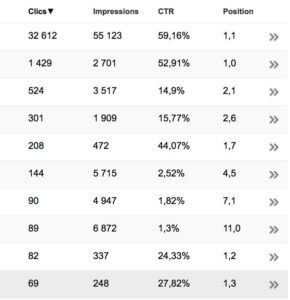
Use this data to find out which keywords are performing best. You can even use them to create new content that people are interested in.
By selecting the different options (queries, pages, countries, devices, etc.) you have key information to optimize your content and best adapt to demand.
If you want to gain more organic traffic, you should use Google Search Console to find popular queries.
Google Search Console – View indexed pages
After improving your HTML, you need to check how many pages are indexed on your site.
You will find this information in the “Indexing Status” section under “Google Index” in your dashboard
This feature allows you to estimate the total number of pages indexed and display organic search results.
If there are specific pages that you don’t want indexed, you can also delete them here.
Look in your sitemaps robots.txt file to see what could be causing the problem.
In the same “Google Index” section, you will find a part called “URL to remove” which is very useful for deindexing pages that you no longer want. However, it is better to do it directly in the robots.txt file for a cleaner approach. But if you’re not comfortable with tech, do it from here.
Monitor rich cards and rich snippets in Google Search Console
Rich cards and rich snippets are enhanced displays of your site in the SERPs. Rich cards are the hardest to get because you have to appear on the first page of Google to get them.
Conversely, rich snippets are quite easily accessible and can greatly increase your CTR. An SEO strategy not to be overlooked.
Here is the difference between rich cards and rich snippets:

To monitor these elements, simply go to the “Appearance in search results” section and follow the guide.
You can discover the pages of your site which appear with enriched results for example. Quite useful for monitoring your structured data implementations.
Submit new pages to Google for recrawling
You have just posted a new article, made a change in your meta description and you don’t want to wait 1 week before Google applies these changes? Submit your pages directly to him using this option!
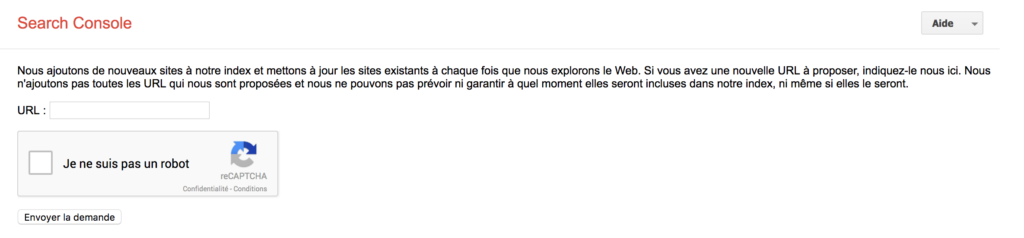
To do this, simply go to this page and paste your URL in the appropriate section and send your request. Your page will then be updated much more quickly.
Analyze backlinks in the SEO tool and develop a solid natural referencing strategy
Google Search Console provides a detailed report on the most frequent links (internal and external links).
GSC gives you the ability to create other backlinks to boost your site.
Backlinks are one of the most important factors when it comes to increasing the visibility of your site.
We recommend numerous backlinks, from varied sites and with fairly high domain authority.
To get started, look at the links to your site by going to the “links to your site” section under the “search traffic” menu.
Here, you will have an overview of the sites most directed towards yours and thus you will be able to adapt your strategy.
If you click “more”, you will find a list of all the sites that have linked to you.
You can even download these links in a spreadsheet to share with your SEO team for example.
If the sites are already giving you backlinks, try emailing them to collaborate even more.
Conclusion
Using Google Search Console is one of the best ways to diagnose problems, optimize your site and even detect new opportunities.
I really use it on a daily basis in my SEO efforts to optimize my website and develop it more quickly.
To do the same, nothing could be simpler. Create a Google Search Console account and get started now. But be careful, there is a lot of information… don’t get lost!
Start slowly.
For example, first examine the different requests that Internet users make to land on your site.
Then little by little, discover the other features.
Check your HTML performance. This is often a major cause of slow or underperforming sites.
Mobile represents a very important part of online searches so don’t neglect it on Search Console and analyze your mobile performance!
In this article, not all the features of Google Search Console have been covered such as the ability to check AMP pages, the option to crawl its web pages like Google and many others.
So you understand, Google Search Console can help you repair and optimize your site to bring more conversions faster.