How to choose the right event management software
Last modified July 18, 2021
When working on an event, aside from finding the venue, you also have to manage the budget, guests, and ensure that the schedule for each activity runs smoothly. But it doesn’t stop there, a good organizer must ensure that not only does the event go according to plan, but also that the engagement of your participants is guaranteed during the event.
Fortunately, today there is software that allows you to better manage and organize an event.
The criteria for choosing your event management software
If you are a Venue Finder agency, freelance in events or venue manager, there are different criteria for correctly choosing event management software.
Collaboration and communication
You will work with many external collaborators when planning your event, such as photographers, caterers, audiovisual providers, speakers, artists, and many others. Stay organized by keeping track of all vendor and speaker information in one central location. You should look for a solution that allows you to easily add contact information, assign tasks, create automatic reminders, track emails and messages. Having all of this in one place will keep everyone on schedule. You and external team members can also upload files such as invoices, scopes of work, maps and diagrams into your event planning software, no matter which device you use.
Registration management
Managing participant registrations should be one of the features to take into account. You should always ensure that people attending the event can register easily and that the appropriate information is provided to them. In this case, you may need to look for a solution that offers robust online registration, which should be able to customize the type of data you collect and provide a unique registration code or identifier for each participant. Consider a product that has registration page templates that you can easily customize.
Automate the event planning workflow
When planning an event, there are many tasks that need to be accomplished by multiple departments. Your event planning software should simplify the process and keep you organized.
Look for a solution that lets you schedule meetings, create, track and assign tasks, automatically send event-related emails, assign approval rights and send you automatic alerts if tasks are falling behind schedule. Additional collaboration features, such as comments and discussions, help speed up communication.
Budget creation and monitoring
One of the first things event planners do is determine a budget. Many event planning software packages include a variety of budgeting and financial reporting tools. More advanced features include the ability to track revenue and expenses, and provide tools to help determine ROI.
For example, some tools allow you to establish budgets based on fixed costs and variable costs per participant so you can analyze the average cost per person. If multiple business units are involved, choose event planning software that allows you to calculate costs for each unit individually.
New event planners should look for software that has templates with pre-established calculations. Templates should be customizable and provide an overview of the target budget, actual cost, payments made to date, and balance due.
Marketing management
When it comes to marketing features, you definitely want something that offers more than traditional email campaigns. Many event planning software packages include the tools needed to create a website and registration page. If you don’t have a technical team, this option could be a great way to get started without stress; Just make sure the editing tools will allow you to make the changes you want. For events with multiple sponsors, make sure there are plenty of customizable ways to highlight them when necessary.
Creation of customizable reports
Reporting is an effective way to determine the ultimate success of your event. Choose event planning software that can automatically run the reports you need. Many offer hundreds of reports, but you may only need a few. Some of the most common types of reports include financial summaries, inventory status, attendee or exhibitor tracking, cross-event comparisons, email marketing, and survey statistics.
You should also have the ability to create branded custom reports where you define specific categories (event type, region, etc.) so you can determine things like ROI. Be sure to choose a solution that allows you to export reports in the format of your choice.
Centralization of files
Dozens of documents, reports, images, emails and more are created when planning an event. To streamline communication and organization, store all of these files in a central location that event collaborators can access at any time. You should therefore look for a solution that allows you to set sharing permissions and provides free access to documents to outside vendors. It must also be able to attach documents and other materials from Google Drive, Dropbox, Box and other applications. A web-based event planning solution would also allow you to access all of your event planning data across multiple platforms, eliminating compatibility issues.
Adaptation for mobile
Your event planning software should be mobile friendly. Some tools even include a way to easily create a mobile registration and event site. To ensure the site will work seamlessly on a mobile browser, check that it uses a responsive design. In addition to a mobile site, some providers offer optional mobile applications for participants. Mobile support isn’t just for attendees, it’s also an important feature for you. Planning an event will take you out of the office and you will likely need access to your files. Make sure the software you choose will work on the devices you and your team use regularly.
How much does this type of software cost?
The price of event planning software may vary depending on the offer. Some companies offer packages that cost a monthly fee and the price increases depending on the number of events you are planning. If you opt for cloud-based event planning software, find out how much storage you will receive. Always ask if there is a limit to the number of people who can use the software. Registration volume is also a method some companies use to determine price. This can be billed as a monthly or annual fee depending on the company.
Which software to choose for event management?
Lab Event is one of the best tools for event management. Their software can be used by all event organizers and planners to manage their event according to the calendar. Lab Event offers event organizers a SAAS tool to manage clients, budgets, service providers, events and activities.
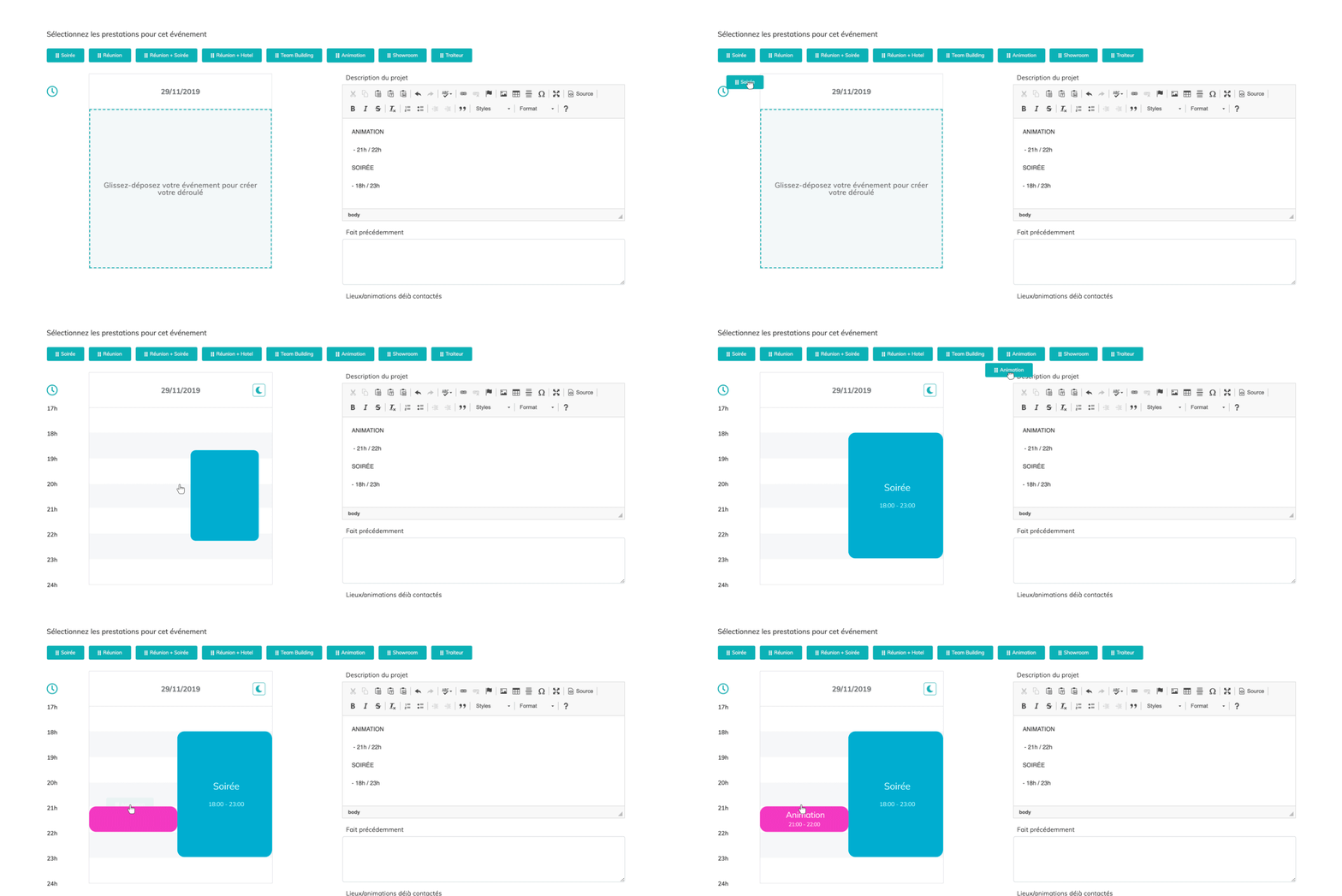
Lab Event is easy to use and has a great interface and support team. Even if this is your first event management software, you’ll find it easy to navigate. Thanks to the platform, you can manage your customers with CRM, plan events, communicate within your team and much more. This software is designed to improve the productivity and efficiency of your team. While being very ergonomic.
Since it is an online tool, it is possible for you and your team to centrally store all documents, images, videos, etc.
If you are an agency, or work in the event planning and management industry, you should try Lab Event to help you work more efficiently. Lab Event offers three plans, Silver for 39 euros, Gold for 59 euros and Platinum for 79 euros per user per month. But don’t worry, they also offer a free plan, at 0 euros per user per month, to try the software with the basic functions.

Passionate about the web and entrepreneurship, I founded Digitiz in 2016. My goal is to pass on my experience to you and to be able to save you time in choosing your tools.
Similar articles
![When to post on Instagram? Best moments [MAJ 2022]](https://davidreyero.es/wp-content/uploads/2023/10/instagram-header-768x432.jpg)