8 Useful Tips to Clean Up and Reduce the Size of Your WordPress Database
Last edited on July 18, 2021 by Digitiz
Whether you need to free up space on your server/database, or for security reasons, “cleaning” your WordPress site on a regular basis is a good habit to get into.
This article offers 8 tips for getting rid of unnecessary and potentially harmful data for your WordPress site. The cleaning will concern images, metadata, unused plugins, etc.
1. Delete article revisions
Since version 2.6 of WorPress, changes made to articles while you write them are automatically saved in the database. This behavior can be useful if you can suddenly lose your changes and with revisions you can therefore revert to an earlier version.
But on the other hand, saving these revisions will consume space and will significantly increase the size of your database. These revisions will therefore have to be deleted. You can do this using a plugin, or directly by modifying your database via PhpMyAdmin but be careful, this mode requires a minimum of knowledge of the SQL language so as not to do anything.
This SQL query will get rid of all revisions of an article, as well as the associated metadata.
DELETE a,b,c FROM wp_posts a LEFT JOIN wp_term_relationships b ON (a.ID = b.object_id) LEFT JOIN wp_postmeta c ON (a.ID = c.post_id) WHERE a.post_type="revision";
To avoid having to manage multiple revisions of articles (or pages) and execute the SQL query each time, you can limit the number of revisions per article (or page) that WordPress will have to save.
To do this, edit your wp-config.php file and paste this line
define ( 'WP_POST_REVISIONS', 3);
This line will tell WordPress to only save the last 3 revisions.
Here is an article that only talks about this first tip to Delete, Limit or Disable WordPress Post Reviews
2. Get rid of unused plugins and themes
Although this advice may be obvious, most WordPress developers tend to forget to delete plugins or themes that they installed for testing or to look for a particular behavior and which are no longer used.
Deleting these plugins and themes will not only free up space on your server, but will also avoid a security problem in the event of vulnerabilities in an obsolete plugin or a non-updated theme.
Unused plugins can be deleted directly from the WordPress site administration via the “Plugins -> Installed Plugins” menu and clicking “delete” of an inactive plugin.
For unused themes (including probably Twenty Fifteen, Twenty Fourteen and Twenty Sixteen) you must use your FTP client and navigate to “wp-content / themes” and then delete the unused themes.
3. Clean up metadata
Over time, and posts or pages are updated, created or deleted, the wp_postmeta table can quickly increase in size and will be filled with unused data. Deleting this old metadata can be done with a plugin or directly with an SQL query:
DELETE pm FROM wp_postmeta pm LEFT JOIN wp_posts wp ON wp.ID = pm.post_id WHERE wp.ID IS NULL;
4. Delete SPAM comments
If you have not yet started using a comment management system like “Disqus” or “Facebook Comment” then there is a good chance that your blog attracts a lot of spammers.
Thanks to the “Akismet” extension available by default on every WordPress site, the majority of SPAM comments are automatically put in a moderation queue.
By connecting to your WordPress administration area, go to “Comments -> All comments”, select the unwanted comments and put them in trash or “junk”.
Don’t forget to empty the trash from time to time.
You doubt it, but there is also (still) an SQL query that will allow you to delete all SPAM comments at once!
DELETE FROM wp_comments WHERE wp_comments.comment_approved = 'Spam';
5. Remove Broken Links
If your site is not new enough, you can bet on the fact that there are already broken links (a referenced link that does not even belong to any page).
Broken links don’t take up much space in your database, but they can cause SEO problems because too many pages leading to broken links penalize Google and other search engine rankings.
To remove broken links, we can rely on the “Broken Link Checker” plugin which, as its name suggests, will look for broken links.
As an example of what the plugin can output as results: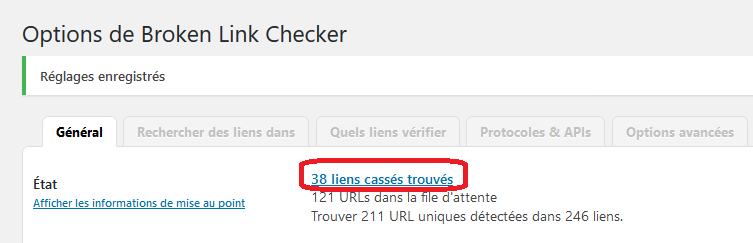
The use of this plugin will be the subject of an entire article to detail how it works.
6. Reduce the size of the database by deleting transient data
Transient data is data temporarily stored in the database and which has a very specific name (containing the word “transient”) and a period after which it expires and will be deleted.
But sometimes plugins will take up a lot of space for transient data and won’t be deleted quickly.
Please note that there is (still?) an SQL query that will delete this transient data:
DELETE FROM `wp_options` WHERE `option_name` LIKE ('%\_transient\_%');
7. Delete unused Tags
It is now past the time when we use several labels (or Tags or keywords) to define our article and to make an internal mapping between the articles of a blog. Today the trend is to no longer use labels but even if we stop using them that does not mean that there will remain for one reason or another lots of labels which are not used in any article.
Once again this goes through SQL and this syntax:
DELETE FROM wp_terms wtINNER JOIN wp_term_taxonomy wtt ON wt.term_id = wtt.term_id WHERE wtt.taxonomy = 'post_tag' AND wtt.count = 0;
8. Delete trackbacks
To put it simply, a trackback is a notification from another site to say that we are talking about you! Example, you are going to write an article that talks about WordPress optimization tips and you are going to mention this article by putting a reference link.
The link you put to reference this article is a trackbacks which will inform me of the fact that we are talking about me, about the article in fact, uhhh in short…
This technique is not that useful after all and a lot of spammers use it, and it can pollute your database… so this super SQL query will just delete them:
DELETE FROM wp_comments WHERE comment_type="trackback";
Conclusion
So here is a list which is of course not exhaustive and which helps you secure and reduce the size of your WordPress database.
If you have other areas for improvement or other advice to share with our readers, do not hesitate to let us know with a comment on the blog.
Similar articles

![Download Facebook video without software [MAJ 2022]](https://davidreyero.es/wp-content/uploads/2023/07/telecharger-video-facebook-768x359.png)